

Prescriptive Architecture Diagram
What Is the Prescriptive Diagram?
Section titled “What Is the Prescriptive Diagram?”The prescriptive architecture report translates your .iw/rules.yaml and .iw/layers.yaml
into a self-contained, interactive HTML file showing what the architecture should look like
alongside what CARI found in the actual code.
Unlike the full architecture report (which infers structure from the import graph), the prescriptive diagram starts from your declared intent:
- Green arrows show explicitly permitted layer flows (
allowed:) - Red dashed arrows show forbidden patterns from your rules
- Named components from
expressesblocks appear as chips inside their layer bands - CARI evidence — actual violations, hotspot scores, hub degree — overlays the intended picture
iw index buildiw index export --prescriptiveopen architecture-prescriptive.html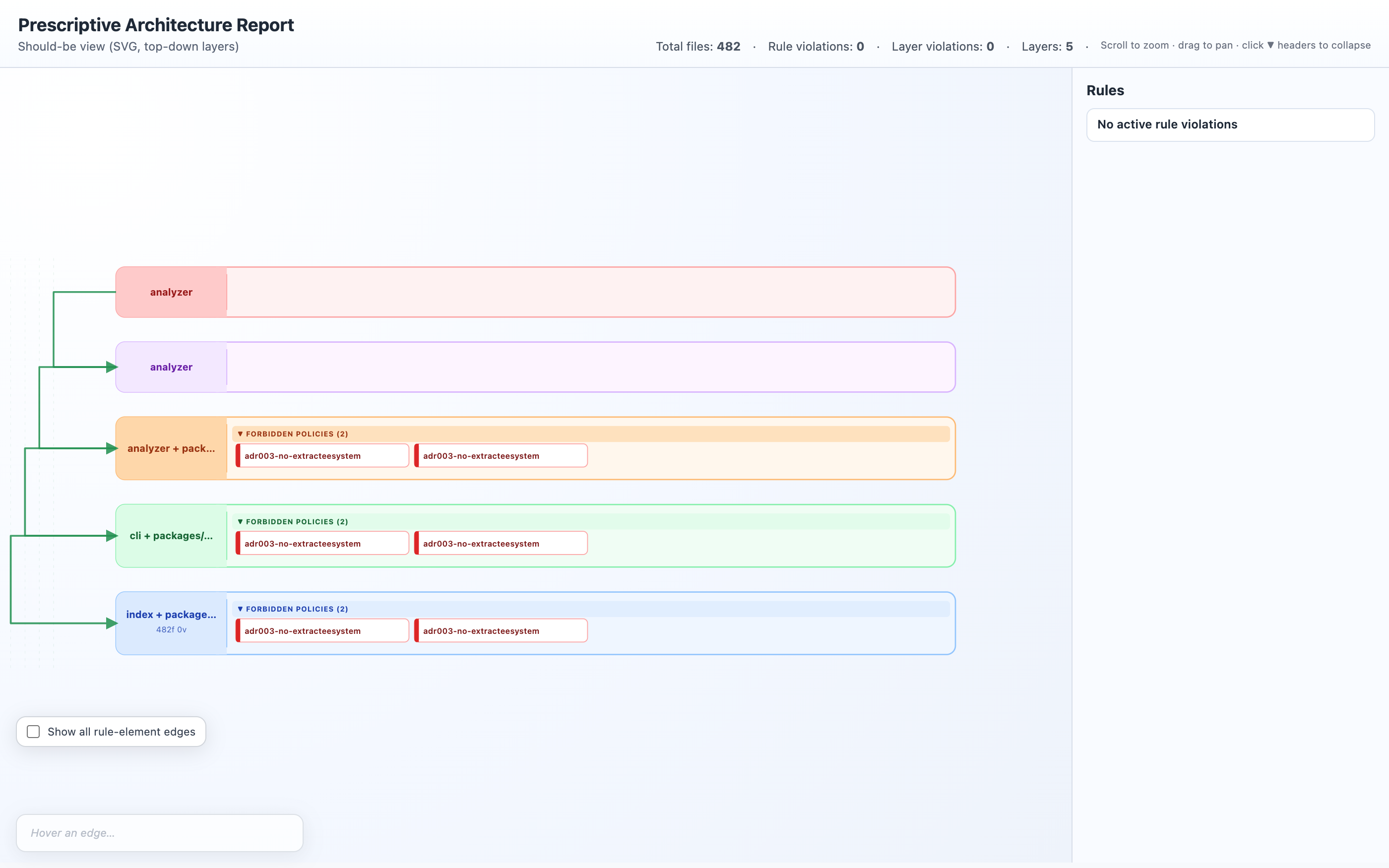
Quick Start
Section titled “Quick Start”# 1. Make sure the index is builtiw index build
# 2. Generate the prescriptive report (requires .iw/rules.yaml)iw index export --prescriptive
# 3. With named rule elements inside each layer bandiw index export --prescriptive --show-rule-elements
# 4. Custom rules config and output pathiw index export --prescriptive \ --rules-config infra/rules.yaml \ -o reports/architecture-prescriptive.htmlSetting Up layers.yaml
Section titled “Setting Up layers.yaml”The diagram reads layer definitions from .iw/layers.yaml. If this file does not exist,
layers are inferred automatically from the import graph (same as iw index layers-infer).
Create .iw/layers.yaml to declare layers explicitly:
layers:  - name: apps/ui    patterns:      - "apps/ui/src/**"    description: "React frontend — views, components, hooks"
  - name: apps/api    patterns:      - "apps/api/src/**"    description: "Fastify API gateway — routes, middleware"
  - name: packages/services    patterns:      - "packages/services/src/**"    description: "Domain service interfaces and business logic"
  - name: packages/data    patterns:      - "packages/data/src/**"    description: "Repository implementations and ORM models"
  # Cross-cutting utilities — side lane in the SVG  - name: packages/shared    patterns:      - "packages/shared/src/**"    side: left    description: "Shared utilities: logging, config, error types"
Grid Layout (Optional)
Section titled “Grid Layout (Optional)”Add geometry fields to control the SVG layout:
layers:  - name: apps/ui    patterns: ["apps/ui/src/**"]    row: 0        # vertical position (smaller = higher in diagram)    column: 0     # horizontal position    col_span: 2   # width in grid columns
  - name: apps/api    patterns: ["apps/api/src/**"]    row: 1    column: 0    col_span: 2
When geometry is absent, layers are arranged in a single top-down column in the order
they appear in layers.yaml.
Layer Configuration Fields
Section titled “Layer Configuration Fields”| Field | Type | Description |
|---|---|---|
name | string | Layer identifier — must match values in rules.yaml allowed: and in: patterns |
patterns | string[] | Glob patterns matching files in this layer |
description | string | Shown as subtitle in the SVG layer band |
row | number | Grid row (smaller renders higher) |
column | number | Grid column (starts at 0) |
col_span | number | Width in grid columns (default 1) |
row_span | number | Height in grid rows (default 1) |
side | "left" | "right" | Place as cross-cutting side lane |
Setting Up rules.yaml
Section titled “Setting Up rules.yaml”See Semantic Rule Checking for the full rules.yaml reference.
For the prescriptive diagram, the key sections are:
allowed: — Green Flows
Section titled “allowed: — Green Flows”version: 1
allowed: - from_layer: apps/ui to_layer: apps/api description: "UI may call the API gateway boundary" - from_layer: apps/api to_layer: packages/services description: "API handlers use domain service interfaces" - from_layer: packages/services to_layer: packages/data description: "Services access repositories"Each allowed: entry renders as a green solid arrow in the diagram.
When allowed: is omitted, the renderer derives permitted edges automatically:
every adjacent pair of layers in declaration order is considered permitted.
expresses — Named Components
Section titled “expresses — Named Components”Use expresses blocks in rules to name specific components and their intended flows.
These appear as chips inside the layer bands when you use --show-rule-elements:
rules: - id: adr003-pipeline-flow description: "Intended ADR-003 pipeline" adr: ADR-003 severity: low expresses: elements: - name: SourceProvider kind: component layer: "packages/providers" - name: AdapterParser kind: component layer: "packages/adapters" flows: - from: SourceProvider to: AdapterParser policy: allowed kind: data forbidden: []Reading the Diagram
Section titled “Reading the Diagram”The prescriptive report is a self-contained HTML file with a pan/zoom SVG canvas and an interactive edge hover panel.
Layer Bands
Section titled “Layer Bands”Each layer is rendered as a horizontal band. The layer name and description appear in
the band header. When --show-rule-elements is used, named components (expresses.elements)
appear as chips inside their band.
Edge Types
Section titled “Edge Types”| Edge style | Meaning |
|---|---|
Green solid arrow (──✓──▶) | Explicitly allowed flow (allowed: entry) |
Red dashed arrow (╌╌✗╌╌▶) | Forbidden pattern from a forbidden: rule |
| Blue dashed arrow | Element-level flow from an expresses.flows entry |
Hover Panel
Section titled “Hover Panel”Click any edge to open the detail panel on the right:
- Type (allowed / forbidden) and severity
- Rule ID and ADR reference
- Description / rationale
- Violation count (for forbidden edges with actual violations)
- Flow kind (data / control, for
expressesflows)
Summary Line
Section titled “Summary Line”The console output and diagram title show a summary:
7 layers · 8 policy edge(s) · 0 rule violation(s)CLI Options
Section titled “CLI Options”iw index export --prescriptive [options]| Flag | Default | Description |
|---|---|---|
--prescriptive | (required) | Generate the prescriptive architecture report |
--show-rule-elements | (off) | Render expresses.elements as chips inside layer bands |
--rules-config <path> | .iw/rules.yaml | Path to rules.yaml |
-o, --output <path> | architecture-prescriptive.html | Output file path |
--explain | (off) | Add LLM-generated rationale to each edge hover panel |
--adr-docs <glob> | (none) | ADR files to use as context for --explain (e.g. 'docs/ADR-*.md') |
--provider <name> | — | LLM provider for --explain: openai or smart-mock |
--model <name> | gpt-4o-mini | Model for --explain |
--api-key <key> | $OPENAI_API_KEY | API key override |
--db <path> | (auto) | Path to index.db |
LLM-Powered Edge Rationale (Optional)
Section titled “LLM-Powered Edge Rationale (Optional)”Add --explain to have the LLM generate a one-sentence rationale for each edge,
sourced from your ADR prose. The rationale appears in the edge hover panel.
iw index export --prescriptive \ --explain \ --provider openai \ --adr-docs 'docs/ADR-*.md'This makes a single LLM call after building the prescriptive data. It injects rationale into each edge’s description field. If the call fails, the diagram is still generated without rationale — the failure is non-fatal.
Auto-Generating layers.yaml from ADRs
Section titled “Auto-Generating layers.yaml from ADRs”Use rules-extract --with-layer-hints to have an LLM read your ADRs and draft a
layers.yaml:
iw index rules-extract docs/ADR-003.md docs/ADR-005.md \ --provider openai \ --with-layer-hints \ --layers-output .iw/layers.hints.yamlCopy the output to .iw/layers.yaml and refine the glob patterns before use.
Comparing Prescriptive vs. Actual
Section titled “Comparing Prescriptive vs. Actual”The prescriptive diagram intentionally shows declared intent. To see the full actual architecture, use the standard export:
# Prescriptive — declared intent (rules.yaml + layers.yaml)iw index export --prescriptive -o prescriptive.html
# Actual — inferred from code (import graph + git)iw index export --html -o actual.html
# Focused actual — just one module's neighbourhoodiw index export --focus src/auth/service.ts -o auth.html
Example: Full Setup
Section titled “Example: Full Setup”# 1. Extract rules from ADRs (with allowed entries + layer hints)iw index rules-extract docs/ADR-003.md docs/ADR-005.md \ --provider openai \ --output .iw/rules.yaml \ --with-allowed \ --with-layer-hints \ --layers-output .iw/layers.hints.yaml
# 2. Review and refine both filescode .iw/rules.yaml .iw/layers.hints.yaml# → copy layers.hints.yaml to layers.yaml after editing
# 3. Generate the prescriptive diagram with rule elementsiw index export --prescriptive --show-rule-elements \ --explain --provider openai --adr-docs 'docs/ADR-*.md'
# 4. Check conformance in CIiw index rules-check --severity high --format json
# 5. Open the reportopen architecture-prescriptive.htmlMCP Integration
Section titled “MCP Integration”Available as a Copilot tool:
"Show me the prescriptive architecture" → cari_focus (with prescriptive mode)"Does the code conform to our rules?" → cari_rules_checkNext Steps
Section titled “Next Steps”- Semantic Rule Checking — full
rules.yamlreference and rule types - Insights Book — add decision tracking, coverage, and living score
- Architecture Analysis — layer inference and the full architecture report
- CI Drift Check — automate conformance checks in CI