

Insights Book
What Is the Insights Book?
Section titled “What Is the Insights Book?”The Insights Book is a multi-chapter, self-contained HTML deliverable that answers “is this project OK?” at a glance. It combines every CARI intelligence signal into one interactive document — no server, no external dependencies, sharable as a single file.
iw index buildiw index export --bookopen insights-book.htmlThe output is a fully self-contained HTML file (~1–5 MB). Share it with your team, commit it as a CI artifact, or attach it to every PR.
Quick Start
Section titled “Quick Start”# Minimal — just needs the indexiw index buildiw index export --book
# Custom output pathiw index export --book -o reports/insights-book.html
# With LLM-generated layer namesiw index export --book --provider openaiThe Chapters
Section titled “The Chapters”The book opens on Executive Summary by default. The sidebar divides chapters into four sections.
Summary
Section titled “Summary”| Chapter | Contents |
|---|---|
| Executive Summary | Living score badge · violation domain pills (structural / behavioral / documentary) · top-3 action items · quick links to all chapters |
| Recommendations | Top-20 cross-domain issues ranked by severity with domain badges (structural = blue, behavioral = purple, documentary = amber) |
Architecture
Section titled “Architecture”| Chapter | Contents |
|---|---|
| Layer Architecture | §17 prescriptive SVG embedded in an iframe — layer bands, allowed/forbidden flow arrows, rule overlays |
| Rules Catalog | Full rules.yaml inventory, filterable by domain / severity; Mermaid and Cypher rule indicators |
| Documentation & Source | Three-panel explorer: docs list, source files, per-file annotation evidence |
| Architecture | §10.1 D3 interactive chart with Layers / Violations / Communities / Dependencies tabs |
| Per-ADR chapters | One chapter per ADR rule: Cytoscape.js + dagre flow diagram, CARI import-graph overlay toggles (churn, hub, community), rule panel, per-rule violations |
Reports
Section titled “Reports”| Chapter | Contents |
|---|---|
| Violations | Domain-grouped: Structural / Behavioral (with confidence badge and WARN mode indicator) / Documentary + Dormant Rules |
| Coverage | Per-layer documentation coverage table with low-coverage warning; Layer Sankey SVG — two-column bezier bands (blue = allowed, red = violation, width ∝ import count) when cross-layer flows exist |
Analytics
Section titled “Analytics”| Chapter | Contents |
|---|---|
| Living Score | 4-dimension breakdown: spec grounding · consistency · freshness · architectural conformance |
| Code Health | Exact clone groups, structural clones, circular imports, boundary violations, unused exports |
| Hotspots | High-churn / low-doc priority table, deep dependency chains, hub entities, code communities |
| Documentation | Orphaned sections, per-doc completeness, design rationale inventory, terminology inconsistencies |
| Priority Files | High-churn low-doc files ranked by urgency score |
| Tech Debt | TODO / FIXME / HACK / XXX inventory with file, line, and kind |
| Test Coverage | Symbol-level coverage % and per-directory breakdown |
| Call Graph | Butterfly trace around any entry-point file; entry file selector, mode selector (calls/trace/reverse), depth slider; supports 20 000+ edge corpora |
Cross-Chapter Navigation
Section titled “Cross-Chapter Navigation”- Domain pills in Executive Summary (e.g., “762 documentary”) navigate directly to the Violations chapter filtered to that domain.
- “Go to chapter →” links in the Executive Summary quick-links section.
- Sidebar is always visible; active chapter is highlighted.
Per-ADR Flow Diagrams
Section titled “Per-ADR Flow Diagrams”Each rule in rules.yaml with a domain: behavioral + mermaid: block or with
a expresses block gets its own chapter with a Cytoscape.js + dagre flow diagram:
- Named components as nodes (layered left-to-right)
- Directed flows as edges — green for allowed, red dashed for forbidden
- Overlay toggles: actual import edges, violations, hotspot scores, hub degree, community label
- Rule metadata: severity, domain, ADR reference, description, violation count
# .iw/rules.yaml — behavioral Mermaid rule- id: auth-login-sequence domain: behavioral severity: high source: type: mermaid_inline mermaid: | sequenceDiagram UI->>AuthService: login(credentials) AuthService->>TokenStore: issue(token) AuthService-->>UI: token forbidden: []CLI Options
Section titled “CLI Options”iw index export --book [options]| Flag | Default | Description |
|---|---|---|
--book | (required) | Generate the Insights Book |
--rules-config <path> | .iw/rules.yaml | Path to rules.yaml |
-o, --output <path> | insights-book.html | Output file path |
--provider openai | (off) | LLM-generated layer and directory names |
--db <path> | (auto) | Path to index.db |
Example: CI Artifact
Section titled “Example: CI Artifact”Generate the book as a CI artifact and attach it to every PR:
- name: Generate Insights Book  run: |    iw index build    iw index export --book -o insights-book.html
- name: Upload Insights Book  uses: actions/upload-artifact@v4  with:    name: insights-book    path: insights-book.html    retention-days: 30
- name: Check Living Score  run: |    iw intent score --format json > score.json    # Fail CI if grade is below C (score < 60)    node -e "const s=require('./score.json'); process.exit(s.score < 60 ? 1 : 0)"
Comparison: Book vs. Other Reports
Section titled “Comparison: Book vs. Other Reports”| Report | Command | What it shows |
|---|---|---|
| Insights Book | iw index export --book | 15+ chapters: summary, violations, architecture, call graph, living score, code health |
| Architecture report | iw index export --html | Inferred layers, community clusters, actual import graph (§10.1 — also embedded in the book) |
| Focused view | iw index export --focus <target> | N-hop neighbourhood around one file or symbol |
The Insights Book is the primary deliverable and the right choice for sharing with stakeholders, architecture reviews, or quarterly health checks.
Next Steps
Section titled “Next Steps”- Prescriptive Architecture Diagram — understand the embedded §17 SVG
- Semantic Rule Checking — write rules for behavioral and structural chapters
- Health Report — run the living score without the full book
- CI Drift Check — gate CI on rule conformance
What Is the Insights Book?
Section titled “What Is the Insights Book?”The Insights Book is a multi-chapter, self-contained HTML report that brings together all of CARI’s architecture intelligence in one interactive document. It combines:
- The prescriptive architecture diagram (intended layer topology)
- Per-ADR interactive flow diagrams
- A complete violations table with severity filtering
- Per-layer documentation coverage and hotspot files
- The Living Documentation Score (spec + consistency + freshness + arch conformance)
- Code health: clones, circular imports, boundary violations, unused exports
iw index buildiw index export --bookopen insights-book.html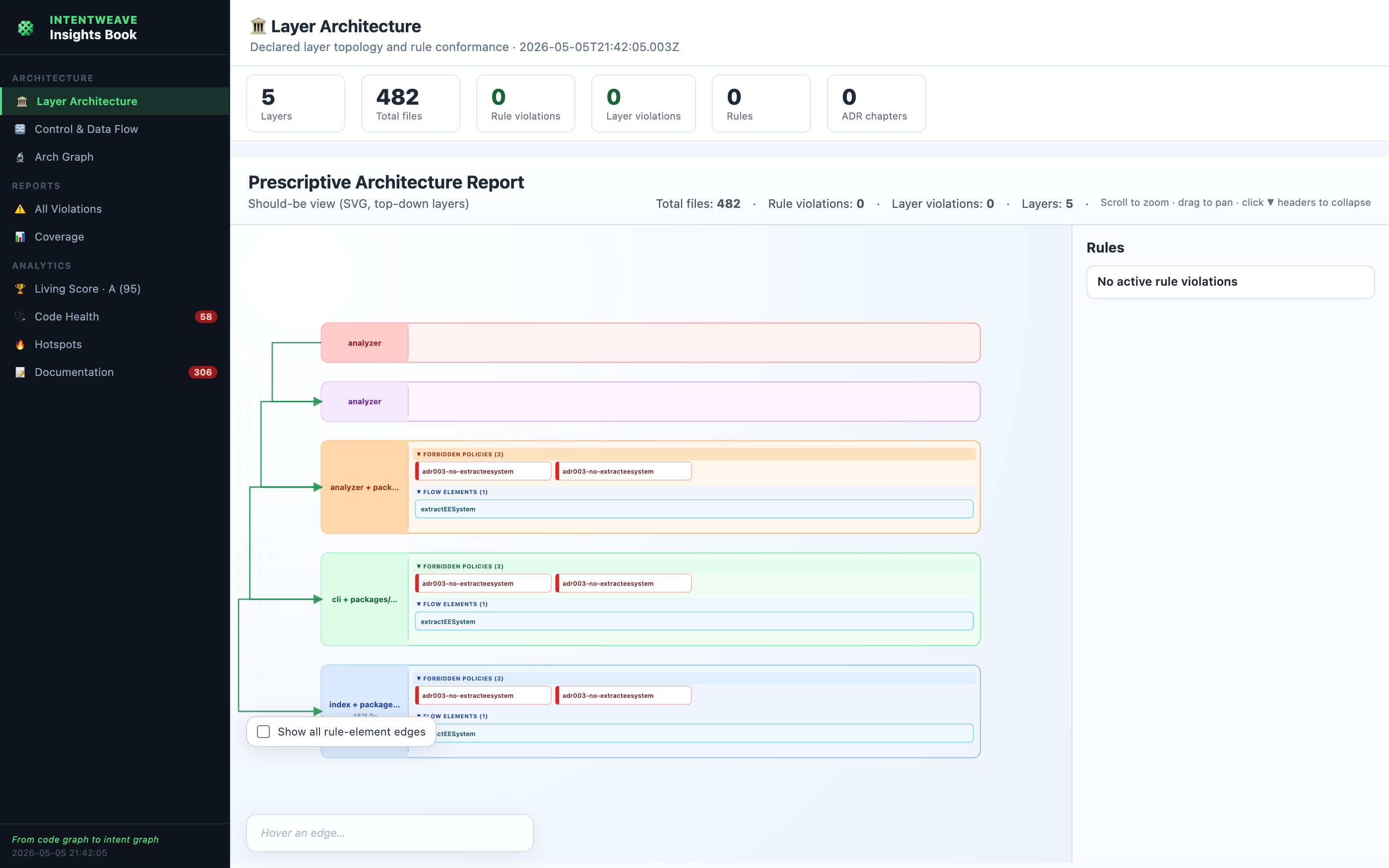
The output is a fully self-contained HTML file (~1–3 MB) with no external dependencies. Share it with your team or commit it as a generated artifact in CI.
Quick Start
Section titled “Quick Start”# Minimal — just needs the indexiw index buildiw index export --book
# With living score and code health includediw index export --book --with-score --with-health
# Custom output pathiw index export --book -o reports/architecture-book.htmlThe Chapters
Section titled “The Chapters”The sidebar divides the book into four sections. Each section is a group of chapters navigated by clicking sidebar items.
Overview
Section titled “Overview”The Overview chapter shows a stat dashboard and embeds the full
prescriptive architecture diagram as an interactive
panel — the same SVG you get from iw index export --prescriptive, but embedded inline.
Stats shown:
- Total files and symbols indexed
- Rule violations (with red/green indicator)
- Layer violations
- Number of ADR chapters
Control & Data Flow
Section titled “Control & Data Flow”One chapter per ADR rule that contains an expresses block. Each chapter shows an
interactive Cytoscape.js diagram with:
- Named components (
expresses.elements) as nodes - Directed flows (
expresses.flows) as edges — green for allowed, red dashed for forbidden - Toggle overlays: actual import edges, violations, hotspot scores, hub degree
- Rule metadata: severity, ADR reference, description, violation count
Use the overlay toggles to compare declared intent against observed behaviour:
[x] Actual imports — do real imports follow the declared flows?[x] Violations — which files breach this rule?[ ] Hotspot score — which components are high-churn?[ ] Hub degree — which components are architecturally central?All Violations
Section titled “All Violations”A severity-sorted table of every rule and layer violation in the codebase. Filter by severity, sort by rule or file, and click any row to jump to the per-ADR flow chapter for that rule.
Columns: rule ID · ADR · severity · file · line · detail · autofix hint
Coverage
Section titled “Coverage”Per-layer documentation coverage derived from the annotation engine:
- What percentage of exported symbols in each layer are mentioned in docs?
- Which are the highest-urgency hotspot files (high churn, low coverage)?
The hotspot table is sorted by urgency score and shows churn count, coverage %, and the layer the file belongs to.
Living Score (optional)
Section titled “Living Score (optional)”When built with --with-score, a dedicated chapter shows the composite
Living Documentation Score — a 0–100 / A–F grade built from four dimensions:
| Dimension | Weight | What It Measures |
|---|---|---|
| Spec coverage | 35% | How many exported symbols are mentioned in documentation |
| Consistency | 25% | Whether the same symbol is named consistently across all docs |
| Freshness | 20% | Whether recently changed files still have current documentation |
| Arch conformance | 20% | Whether imports follow the declared layer and rule constraints |
Code Health (optional)
Section titled “Code Health (optional)”When built with --with-health, a chapter showing:
- Exact clones — files with identical function body hashes
- Structural clones — type-2 clones (same control flow, different identifiers)
- Circular imports — import cycles and their length
- Boundary violations — cross-package internal imports
- Unused exports — exported symbols that are never imported
CLI Options
Section titled “CLI Options”iw index export --book [options]| Flag | Default | Description |
|---|---|---|
--book | (required) | Generate the Insights Book |
--with-score | (off) | Include the Living Documentation Score chapter |
--with-health | (off) | Include the Code Health chapter |
--show-rule-elements | (off) | Render expresses.elements chips in the embedded prescriptive diagram |
--rules-config <path> | .iw/rules.yaml | Path to rules.yaml |
-o, --output <path> | insights-book.html | Output file path |
--db <path> | (auto) | Path to index.db |
Using with Prescriptive Rules
Section titled “Using with Prescriptive Rules”The Insights Book uses the same rules.yaml and layers.yaml as the prescriptive diagram.
The per-ADR chapters are generated from rules that have an expresses block:
rules: - id: adr003-pipeline-flow description: "Intended ADR-003 pipeline: Providers → Adapters → Workers" adr: ADR-003 severity: low expresses: elements: - name: SourceProvider kind: component layer: "packages/providers" - name: AdapterParser kind: component layer: "packages/adapters" - name: PipelineWorker kind: component layer: "packages/pipeline" flows: - from: SourceProvider to: AdapterParser policy: allowed kind: data - from: AdapterParser to: PipelineWorker policy: allowed kind: control forbidden: []A rule without expresses still appears in the All Violations chapter (if it has violations)
but does not get its own per-ADR flow chapter.
Example: CI Artifact
Section titled “Example: CI Artifact”Generate the book as a CI artifact and attach it to every PR:
- name: Generate Insights Book  run: |    iw index build    iw index export --book \      --with-score \      --with-health \      -o architecture-book.html
- name: Upload Insights Book  uses: actions/upload-artifact@v4  with:    name: architecture-book    path: architecture-book.html    retention-days: 30
- name: Check Living Score  run: |    iw intent score --format json > score.json    # Fail CI if grade is below C (score < 60)    node -e "const s=require('./score.json'); process.exit(s.score < 60 ? 1 : 0)"
Comparison: Book vs. Other Reports
Section titled “Comparison: Book vs. Other Reports”| Report | Command | What it shows |
|---|---|---|
| Full architecture | iw index export --html | Inferred layers, community clusters, actual import graph |
| Focused view | iw index export --focus <target> | N-hop neighbourhood around one file or symbol |
| Prescriptive diagram | iw index export --prescriptive | Declared intent — allowed/forbidden flows |
| Insights Book | iw index export --book | All of the above, plus violations, coverage, living score, and code health in one file |
The Insights Book is the most comprehensive output and the right choice for sharing with stakeholders, architecture reviews, or quarterly health checks.
Next Steps
Section titled “Next Steps”- Prescriptive Architecture Diagram — understand the embedded SVG
- Semantic Rule Checking — write rules that generate per-ADR flow chapters
- Health Report — run the living score without the full book
- CI Drift Check — gate CI on rule conformance