

Focused Architecture View
The Problem
Section titled “The Problem”Large codebases have hundreds of files. A full architecture diagram is overwhelming and unreadable. When onboarding to a module, reviewing a PR, or assessing change impact, you need a scoped view — just the target file and its neighbourhood.
iw index focus builds exactly that: an N-hop subgraph around any target, with layer
context, hub detection, and an interactive HTML report. Programmatically, the same data
is available via CariIndex.focus() (or the focus() function from @intentweave/index)
and rendered to HTML by focusReport.
Quick Start
Section titled “Quick Start”# Build the index (if not already done)iw index build
# Text output: see the neighbourhood of a fileiw index focus src/auth/service.ts
# Interactive HTML reportiw index export --focus src/auth/service.tsopen focus.htmlWhat You Get
Section titled “What You Get”Text Output
Section titled “Text Output”iw index focus packages/cli/src/commands/indexBuild.ts🔍 Focus: packages/cli/src/commands/indexBuild.ts 15 nodes · 17 edges · 2-hop view (25 in full neighbourhood)
Node Layer Dependents Hop ─────────────────────────── ──────────────────────────────── ────────── ──── ⭐ indexBuild packages/cli + packages/index 1 0 cli packages/analyzer + packages/core 0 1 embed packages/cli + packages/index 0 1 evidence packages/cli + packages/index 0 1 impact packages/cli + packages/index 0 1 constants packages/cli + packages/index 13 2 ...Interactive HTML Report
Section titled “Interactive HTML Report”The HTML report is a self-contained file (~200 KB) with three interactive views, pan/zoom controls, and an architecture insights panel.
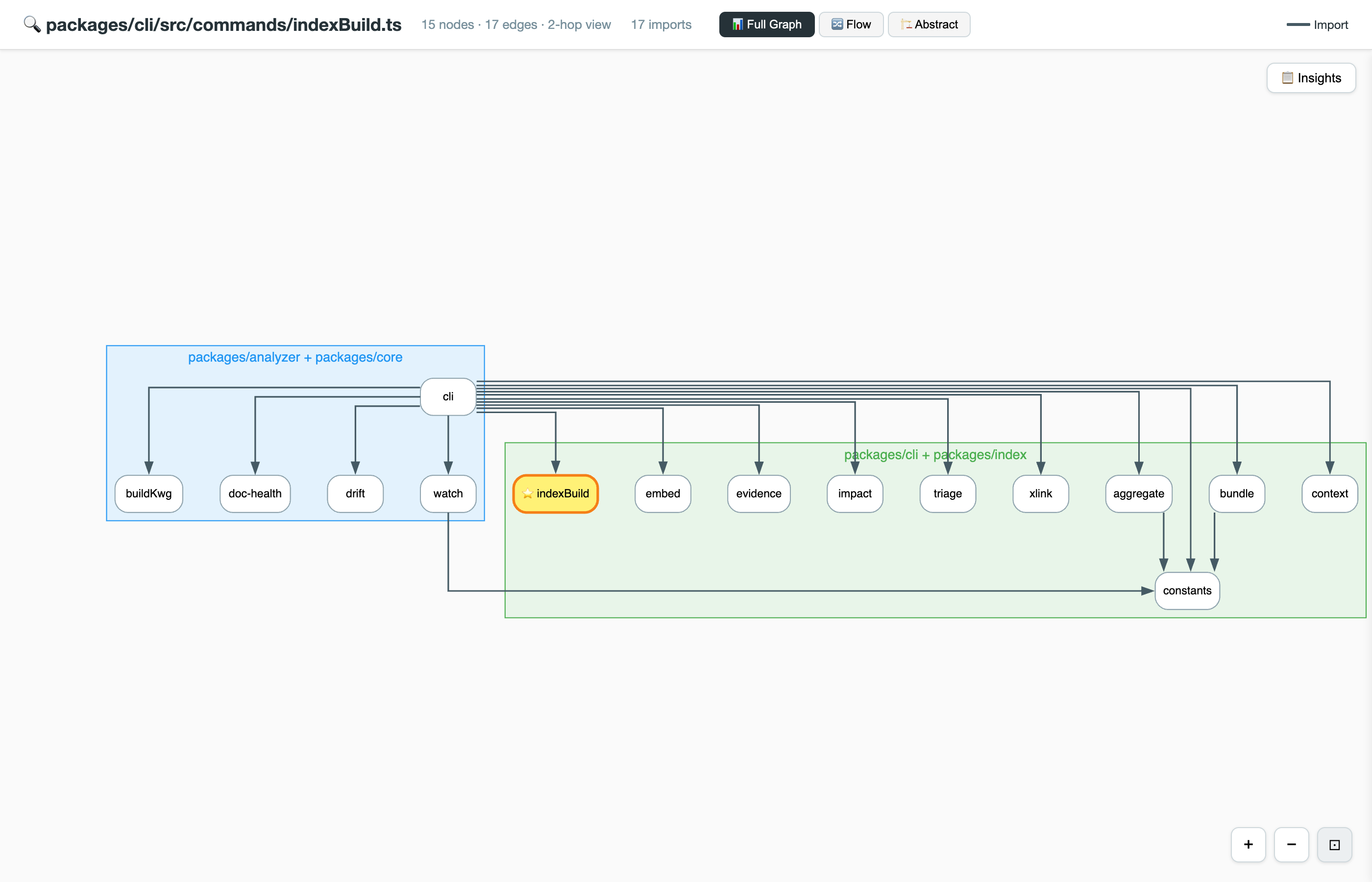
The target node (⭐ yellow) sits in the centre. Files are grouped into coloured architectural layer clusters derived from the import hierarchy. Arrows show import dependencies flowing from consumer to dependency.
Three Views
Section titled “Three Views”Full Graph
Section titled “Full Graph”The default view. Shows all edge types:
- Solid dark arrows — import dependencies (A → B means A imports B)
- Dashed orange lines — co-change signals (files that change together in git)
- Dotted blue lines — documentation co-mentions (files discussed together in docs)
Nodes are grouped into layer clusters. Node size reflects transitive dependents: bigger nodes have more downstream impact if changed.
A linearised import flow through the target. Entry points (callers) on the left, the target in the middle, dependencies on the right. Useful for understanding data flow direction through a module.
The flow view filters the imports table to a directed path through the target,
using the same focus() subgraph query with edge-type filtering applied by focusReport.
Abstract
Section titled “Abstract”Nodes are collapsed by community into meta-groups. Instead of individual files, you see community clusters as single nodes connected by aggregate edges. Useful for understanding high-level module relationships when the full graph is too detailed.
Insights Panel
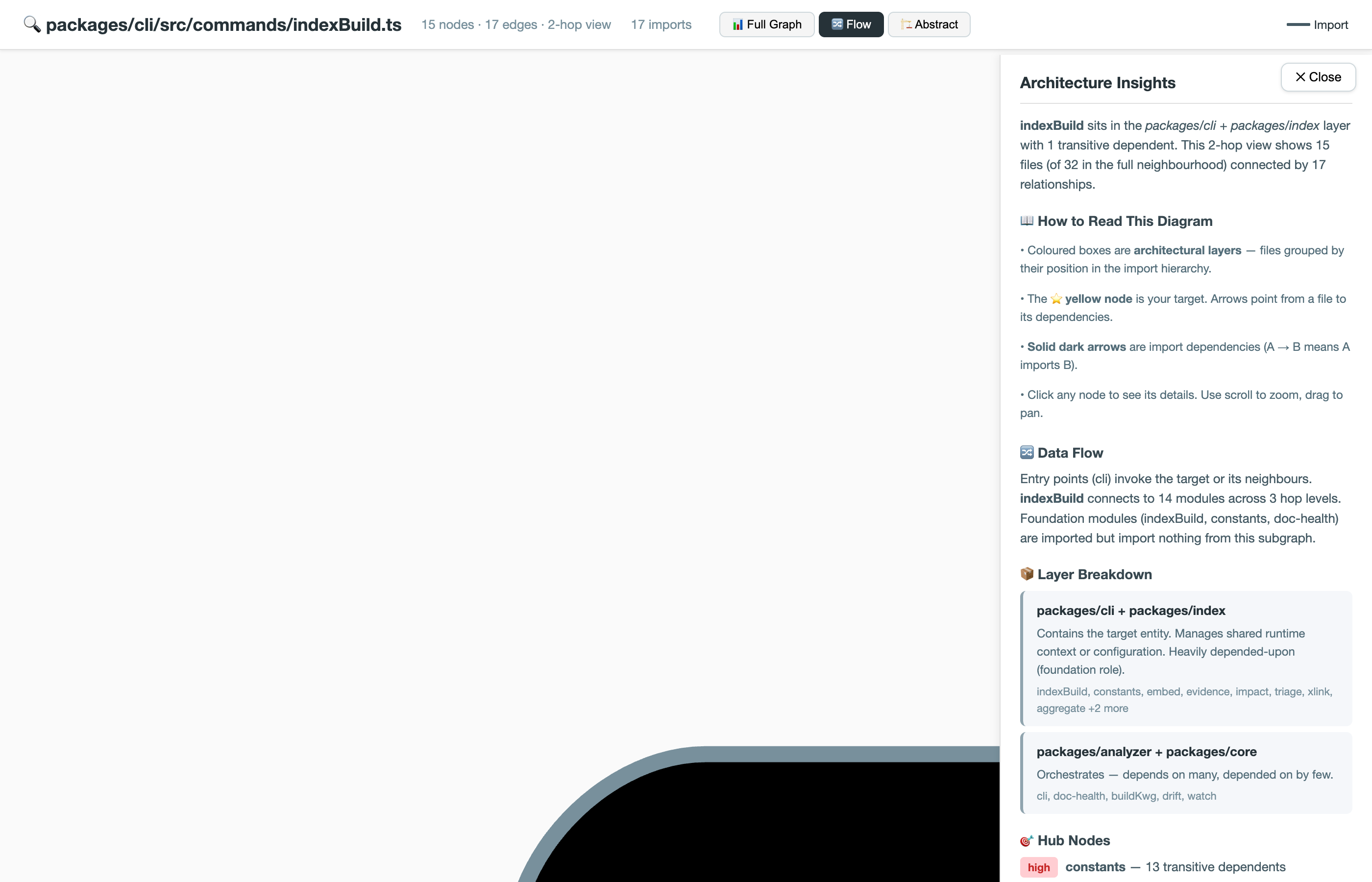
Section titled “Insights Panel”Click the Insights button (top-right) to open the architecture insights panel. It provides automated analysis of the focused subgraph:
Sections
Section titled “Sections”| Section | What It Shows |
|---|---|
| Target Summary | Where the target sits, its layer, and transitive dependent count |
| How to Read This Diagram | Legend explaining node colours, edge types, and interactions |
| Data Flow | Entry points, connection depth, and leaf modules |
| Layer Breakdown | Per-layer cards listing files, their role, and average hop distance |
| Hub Nodes | High-connectivity nodes with risk badges and splitting recommendations |
| Key Observations | Warnings about truncation, same-layer coupling, upward violations |
| AI Narrative | LLM-generated architecture explanation (only with --explain) |
Target Resolution
Section titled “Target Resolution”The <target> argument is flexible. CARI tries to resolve it in order:
- Exact file path —
src/auth/service.ts - Partial filename —
service.ts(matches shortest path) - Symbol name —
AuthService(looks up the symbol registry) - Annotation keyword —
authentication(finds files annotated with the term) - Natural language —
"user login flow"(TF-IDF ranked retrieval)
# All of these work:iw index focus src/auth/service.ts # exact pathiw index focus service.ts # partial filenameiw index focus AuthService # symbol nameiw index focus "authentication" # keywordiw index focus "user login flow" # natural languageCLI Options
Section titled “CLI Options”iw index focus
Section titled “iw index focus”| Flag | Default | Description |
|---|---|---|
<target> | (required) | File path, symbol name, or keyword |
-h, --hops <n> | 2 | Number of import-graph hops to expand |
-n, --max-nodes <n> | 25 | Maximum nodes in the subgraph |
-f, --format <fmt> | text | Output format: text or json |
--db <path> | (auto) | Path to index.db |
iw index export --focus
Section titled “iw index export --focus”| Flag | Default | Description |
|---|---|---|
--focus <target> | (required) | File path, symbol name, or keyword |
--hops <n> | 2 | Number of import-graph hops |
--max-nodes <n> | 25 | Maximum nodes in the subgraph |
-o, --output <path> | focus.html | Output file path |
--explain | (off) | Add LLM-narrated architecture explanation |
--provider <name> | — | LLM provider (openai or smart-mock) |
--model <name> | gpt-4o-mini | Model for --explain |
--db <path> | (auto) | Path to index.db |
LLM-Powered Explanation (Optional)
Section titled “LLM-Powered Explanation (Optional)”Add --explain to generate an AI architecture narrative in the insights panel:
iw index export --focus src/auth/service.ts --explain --provider openaiThe narrative covers:
- What the target module does and its responsibilities
- How the layers are organized around it
- Data and control flow patterns
- Architectural risks and coupling concerns
- Recommendations for newcomers exploring this area
MCP Integration
Section titled “MCP Integration”The focused view is available as a Copilot tool:
"Show me the architecture around auth.ts" → cari_focus| Parameter | Default | Description |
|---|---|---|
target | (required) | File path, symbol, or keyword |
hops | 2 | Expansion depth |
maxNodes | 25 | Node limit |
Use Cases
Section titled “Use Cases”Onboarding to a Module
Section titled “Onboarding to a Module”iw index export --focus src/pipeline/orchestrator.ts --hops 3 --explain --provider openaiNew team members get an interactive map of the module’s neighbourhood with an AI-written explanation of what each layer does and how data flows through it.
PR Impact Assessment
Section titled “PR Impact Assessment”iw index focus src/database/schema.ts --hops 2Before merging a schema change, see exactly which files are in the blast radius — how many transitive dependents exist, which layers are affected, and where hub nodes concentrate risk.
Architecture Review
Section titled “Architecture Review”iw index export --focus "AuthService" --hops 2 -o auth-architecture.htmlGenerate a focused report for a design review, scoped to just the authentication subsystem. Share the self-contained HTML with reviewers who don’t have the project checked out.
Next Steps
Section titled “Next Steps”- Architecture Analysis — full-project layers and reports
- Connections & Gaps — drill into specific entity relationships
- CI Drift Check — automate drift checks in CI
- CLI Reference — full command documentation